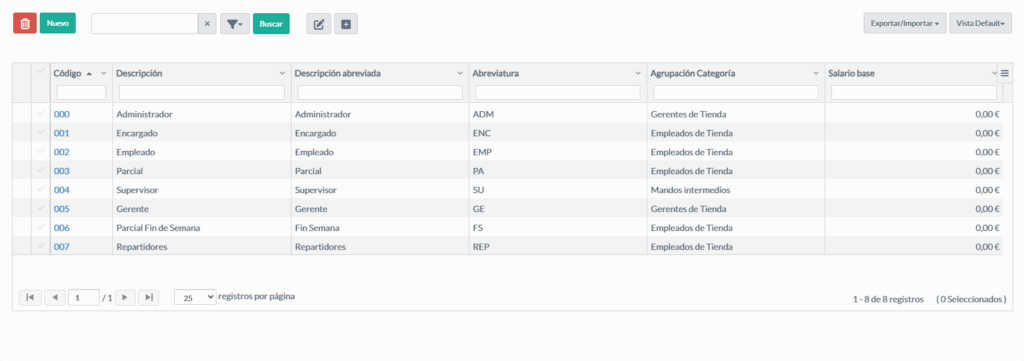
This maintenance module allows managing the different staff categories, as well as their salary parameters and operational configurations.
Staff Category Maintenance Fields #
General Information #
Field Type Description Description string Full description of the staff category. Short description string Reduced version of the description. Auxiliary description string Additional or complementary information. Abbreviation string Short identifier of the category. Order integer Order or priority within the category list.
Salary Parameters #
Field Type Description Base salary monetary Base salary associated with the category. Fixed salary boolean Indicates whether the category has a fixed salary. Maximum daily working hours decimal Maximum number of hours per working day. Maximum consecutive working hours decimal Maximum number of continuous hours allowed. Hourly rate monetary Amount per hour worked for this category. Number of calendar vacation days integer Assigned vacation days. Apply bonus boolean Indicates whether bonuses apply to this category. Bonus percentage decimal Percentage of the applied bonus.
Payroll Configurations #
Field Type Description Send night hours to payroll boolean Indicates whether night hours are sent to payroll. Send overtime hours to payroll boolean Indicates whether overtime hours are sent to payroll. Send holiday hours to payroll boolean Indicates whether holiday hours are sent to payroll. Send bonus to payroll boolean Indicates whether the bonus is sent to payroll.
Other Functional Parameters #
Field Type Description Grouping description master table Group to which the category belongs (e.g., Employees, Managers). Affects profitability boolean Determines whether it influences profitability calculations. Affects home delivery boolean Indicates whether it affects home delivery calculations. Hide hours from monthly closing boolean Allows hiding these hours in the monthly closing.
Recommended Usage Flow #
Open the Staff Categories module.
Click New to create a category.
Complete the general information.
Configure salary parameters, hours, and bonuses.
Adjust payroll options.
Save the category.
Assign it to employees from the Staff module.
Relationship with Other Modules #
Staff Staff: every employee must have an assigned category.
Notes and Best Practices #
Do not delete a category if it is assigned to active employees.
Use duplication to create similar categories without starting from scratch.
Maintain a logical order to facilitate searches.